September & October

I’ve been sitting on these photos for a while. I wanted to finish off my kids scrap calendars before I stared posting my final layouts. But I’m still not done. So I’ll just go ahead and post what I have. Besides it is a long enough post with what I have that I don’t really need to add more!

Oldest child… September. This layout came from a class that I took at a Creating Keepsakes Convention. I have a bunch of finished pages from classes sitting around that I haven’t figured out what to do with. I love taking the classes every year but every year I know I don’t really use the pages. I work by fitting my layout to my photo/story and have a really hard time fitting a photo to a pre-made layout. (Especially when the colors are not my favorite, as is the case here). I added a few extra touches and a jumbo vertical title to this page to accommodate my one photo, instead of the multi-photo layout it was designed for. I do think the color scheme makes the flowers work for a boy layout.

Oldest child… October. I kept the journaling minimal on this one because most of the story is written over his calendar companion page for both September and October. (If you are new to my blog you can see how I do my calendar pages in an older post and then this year’s version.) Because the page is about his Lego robotics team I played with wire to represent a electronic circuit type look.

Middle child… September. You guys have seen this one before when I talked about the technique of cutting a mask using the cricut and a page protector. So here is the rest of the story behind this layout. I had one photo that fit with a story to tell for the month of September. And this isn’t even a good photo. It is small, and it is only the back of my daughters head sitting with her friends (and the backs of their heads!). But it was a story I wanted to tell. So I went with it. With such a small photo I knew I would need a minimalist layout so the photo wouldn’t get lost. I really like how it came out.

Middle Child… October. Okay I admit it. I just wanted to play with my Martha Stewart bird punch. I fell in love with the punch when I saw it used on someone else’s project. I went out and bought it and it has been sitting in my drawer. Hmmm. What to do with it? So I made my title fit a birt theme and went with it. Sometimes I just like to play with product and that is okay too.

Youngest child… September. This story has it’s own story! My daughter’s first preschool didn’t work out. So we tried a second preschool, which we just quit because it didn’t work out for another reason. And so we are on to another care situation. We’ll see if I need to make a scrapbook page about that one too.

Youngest child… October. This is another layout that I did not create. It is one from the convention. This was another month that I didn’t have a great photo for. Hmmm. Think I gotta get my photo act together a little more.

Rolling with the MPS challenge

(NOTE: My entry for the MPS DT challenge is 2 posts down.)

I wanted to make a thank you card for my daughter’s preschool teacher. Even though she was a very nice person and really easy to talk to, my daughter did not like preschool. She was “fine” during school, but at home she would hide under the bed on mornings it was time to go. All the rest of the days she would worry about when the next preschool day was. So after a couple of months of trial, we decided to pull her out. I just wanted to let her teacher know that I appreciated her trying to make my daughter feel welcome at school.

When I started this card all I knew is that I wanted an image of holding hands, partially because it shows the caring relationship and partially because the preschool is called Hand In Hand. In flipping through A Child’s Year Cricut cartridge I found what I was looking for. At first I tried to just blow up the hand holding (on my Gypsy) to put just that extra large image over the entire card front. But at such a large size, the image lost it’s context. So I went with using the entire image (after trimming of the grass from under their feet) and highlighting the hands with a “spotlight” circle punch. When I chose colors, I decided to keep up the color challenge from the design team call from Robyn over at My Pink Stamper. I think it turned out sweet. Enjoy!

Recipe

precut card: The Paper Company
pattern paper: DCVW
carstock: Stampin’ Up, Bazzill
spray Ink: Tattered Angels
die cutting: Cricut (w/ A Child’s Year)
stamp, ink, ribbon, punches: Stampin’ Up
bling: Want 2 Scrap

Looking Forward, Looking Back

A frozen fountain near home.

The new year is traditionally a time to look forward and to look back. I don’t personally find the New Year a magical time to follow this process. I think change & reflection can happen at any point in your life, and in fact should happen often! But since it is on my mind and since many find this the season for reflection, I thought I would go ahead and share my thoughts.

Last year I posted a list of my scrapping goals for the year. I accomplished every one of them (well, except #5 really, but that is a tall order). They were little goals. Goals to push myself and my boundaries. They were goals to try something new and different. And I did that. No real big consequence came of them, but that is not the point really. The point is to try, to reach and to grow. And I did that too.

I’m a person who believe that learning is critical. If you aren’t learning, then you might as well be dead! Of course, this year is no different! I have things I want to work on.

  1. I’d love to improve my photography. I’m largely still in point and shoot land. I’ve been experimenting with the manual settings on my camera and feeling confused by it all. I consider myself a person who learns new things quickly, but this one is taking me a long time here.
  2. More videos! When I am looking for info out there in blog land I am drawn to the videos. I’m very much a visual person and the still photos & text, while informative, don’t do it all for me. And if that is what I am seeking, I’m sure others out there are too. I’d love to be a contributor to that pool of info and not just a consumer!
  3. Live in the moment more. I scrapbook because I have such a horrible memory. It seems to me that as soon as something happens, I’ve forgotten the details. But I wonder how important it is to remember those things for later. I wonder how important it is to really exist in the now. This seems to be the opposite of what scrappers try to accomplish but I think there should be a little bit of balance on that one!

So that is what is on my mind as I start this New Year. And since my 3, almost-4, year old is begging me to come upstairs now, I think I’ll go live in the moment.

Happy New Years to all of you!

Craft Room Decorating & My Pink Stamper Challenge

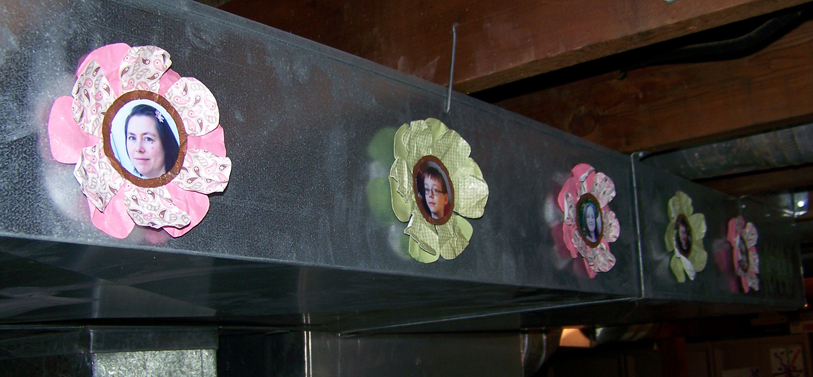
Hey everyone. I wanted to share this project with you today. I made these sweet photo flowers for two reasons. The first is that I am on a mission to decorate my craft space. Since I work in the unfinished basement I don’t have the prettiest of spaces. As you can see here, my craft table faces the furnace and water heater. I LOVE my space but I am getting tired of looking at the utilities. So, I’m starting to do something about it! Then today Robyn, over at My Pink Stamper, posted a message saying she is looking for 2 members for the next term of her design team. In order to apply for the position I have to create an item following her challenge: use the cricut and the colors of pink, green and brown. So I decided to create a room decor item to spice up my space. Keep reading and I’ll show you how I made these flowers and give you some ideas of what else you can do with them!

Recipe

  • cardstock: Bazzill and Stampin’ Up
  • pattern paper: Stampin’ Up and Hot Off The Press
  • spray inks: Tattered Angels & Clear Snap
  • die products: Circut using Plantin Schoolbook
  • foam adhesive: Therm O Web

Steps

1.  Use the cricut to cut your photos into 2″ circles. There are other ways to do this, but this is my favorite method. Choose photos that have the focal image that is about 2.25″ square. Next, create a template that you will use to line up and cut your photos. To make the template, place a scrap piece of cardstock carefully along the guide edges on the upper right of your mat. This part is important because it is going to help you line up your photos correctly. Load your mat, paying attention to where your mat sits flush when you load it (mine sits more to the left of the little guide bump). Insert your mat, choose the circle from the Plantin Schoolbook cartridge and cut once at 2″ (I used the real size feature to be sure my circle is really 2″). Unload the mat. Carefully lift up the top right corner and slip your photo underneath. Move the photo around until it fits how you like within the circle template. Be sure to trim off any of the photo that overhangs the mat! Lift away the template. Load your mat just like you did when you cut the template, then cut that 2″ circle again. Remove your photo, replace your template carefully on the guide lines and repeat this process for each photo you want to cut.

2.  Choose papers for your flowers. I decided to make the flowers have two layers with a center circle to hold the photo. I chose pink papers for the girls in the family and green papers for the boys with brown paper for the center. Each flower has a solid cardstock as the bottom layer and a pattern paper as the top layer. I cut the flowers at 5.25″ and the center brown circles at 2.5″ again using real dial to be sure they come out the size I expectt. Everything then got a good spray of shimmery inks. While the pieces were still wet I crumpled them up and then smoothed them back out to give them more texture. After they dried I assembled everything, using pop dots to lift up the center of the flower just a bit.

3.  I decided to mount these flowers on the edge of the furnace ducts. The sheet metal of the ducts will act as a nice backdrop for the flowers. I used one of my favorite products, 3M Command Hooks velcro-type strips, to attach the flowers to the ducts. That way if I get tired of the flowers or the placement I can remove the 3M strips from the items and move or replace them. The 3M strips have a removable adhesive that can be replaced with refill adhesive strips. Below you can see what the strips look like and how the look mounted to the ducting. And finally you can see how all the flowers look all lined up.

If you don’t have ugly ducts you need to hide, you could mount these straight to a wall, use them in a scrapbook page or how about this idea… Attach each flower to a colored craft stick and add a leaf (also from Plantin Schoolbook). Then stand all these in a shallow vase with foam in the bottom. Add a ribbon to the vase and display this never-wilt bouquet!
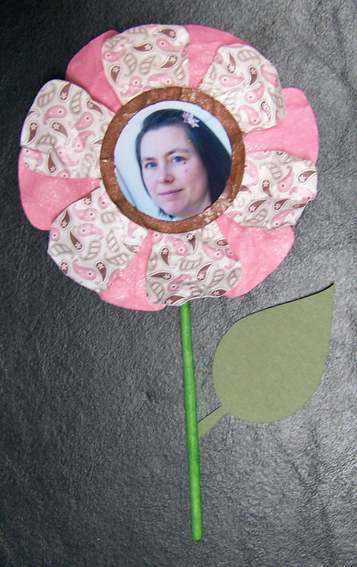
I hope I have inspired you to create some home decor item! And I’ll keep you posted with photos as I add on to my furnace camouflage project!

First Video!

I’m so excited. My hubby helped me get his unused copy of iMovie over to my computer and I figured out (FINALLY) how to edit my video. So I have an intro, with music by said fabulous hubby, my video and a lovely ending with more music. Wowza. I feel great having figured all of this out (with some help). Now the video quality isn’t great, but this is my first try so cut me some slack people 🙂 Hope you enjoy!

BTW, I refer to the project I made in the video that has a mushroom on it. You can see the project here.

Playing catchup

As you know I spent a long span of time not doing much in my craft room. That left my kids scrap calendars way behind. And one of the very reasons I do these calendars is so that I DON’T fall behind. Go figure! At any rate, my goal is to get everything caught up by the end of the year and I am well on my way. I have gotten through October for my youngest child and September for the other two.

Here are July and August layouts for each of my three kids. Each of these layouts had their own spark of inspiration. You can see a note on each photo about what inspired the page (other then the photos/story of course) Hope you find some inspiration from them in some way.

*inspiration: The leftover “Friends” rubon from a rubon set along with my Cricut Light Meow cartridge.

*inspiration: The postage stamp frame (aka Technique Tiles) from Technique Tuesday and the fact that I ran out of the letter “e” in my alpha set!

*inspiration: leftovers from a monthly kit and some beautiful buttons that I haven’t put away yet.

*inspiration: I just loved this little piece of burlap I had from some kit. Got my mind rolling in a “nature” way and I searched my stash and found some great nature stickers and seashell themed chunky shapes. Sorry the title “Creature Love” didn’t photograph well at all.

*inspiration: In searching for an energetic paper for this layout I found this star paper and it led the way to the rest of the page.

*inspiration: I scraplifted this one from Creating Keepsakes magazine. There was a layout in there with borders built with circular elements and I just lifted that idea.

This weeks busy work

Every year I think I am going to get it together way ahead of time and every year I don’t. I either just delay or come up with inspiring ideas at the last minute. This year it was a little of both… I delayed on my Christmas cards and came up with inspiring ideas for small gifts for friends at the last minute. So here is what I made this week.

First off, I finished off my Little Book of Thanks album that I had showed you the beginnings of. Just wanted to let you see how I finished the inside. I put a photo of each family member opposite their personal word of thanks. Then I went online and found a quote that in some way fit that persons personality and added it to the opposite page.

Next…Christmas cards! I desgined these on the Gypsy and had a bunch of fun doing it. It was also nice that I could just attend the Cricut when it needed loaded/unloaded. All the other work (cutting all those elements!) was done for me while I worked on other things. Because I used just cardstock and a little stickles these cards cost me less than $2 to make 14 lovely, handmade cards. (Yeah, I know it doesn’t take the cost of the tools into account but that is another story!)

Then…9 votive candle holders out of vellum. I scored some really cheap electric votive candles at Big Lots before Halloween and then sat staring at them deciding what to make. Then inspiration struck! I used alcohol ink to blend a background, stamped my favorite trees (from Stampin’ Up) on there with StazOn, added a date stamp and a snowflake cut on the Cricut. Elegant yet simple.

And Finally, these little cocoa treat pouches. Again, designed on the gypsy and left to cut elements out while I was working on 0ther things!

Gypsy Newbie

I have been playing with my Gypsy and I am loving it the more I play with it.I still have some questions, but so far I am finding it fantastic. I am learning a great deal from YouTube videos posted by other Gypsy users. Just look at the bottom of this post to see what newbie Gypsy videos I found very helpful!

Now the good things about my toy…

  • I love being able to weld images together to create my very own image; this is especially true for making my own phrases.
  • I love that I can spread individual images out over the virtual mat so I can see exactly how much space each item will need to cut. I am finding that this is saving me time and paper because I know exactly how big it will be before I cut. That means no trial and error when cutting my actual paper and having to toss out images that are the wrong size!
  • I love that I can save projects to come back and work on later.
  • I love that I can set up templates for things I might use over and over. For example I set up one file with different card fronts sized at .25″ smaller than the A2 size card. I have a scallop, rectangle, oval and marquee shape.

Okay, so with all the things I love there are still some downsides. I am finding that the search feature is not very complete. For example there may be an image that is a tag that has a butterfly cut in the middle of it. This image in NOT listed in the butterfly category in the search. And if this image is not categorized, how many other images am I missing when I do a word search? Plus, the word I would use to describe a shape, such a flourish or scroll, may not be the word that the Gypsy know the shape to be called. This is some human/computer interface challenge that I mostly knew would be a problem. I was just hoping Provo Craft would have had a more detailed oriented mindset when creating their labels. And a final note on naming shapes… I am not sure how to see what a shape is names once I have seen it and want to use it. It would be nice to see what an item is called so that I could get a better sense of how things actually are labeled so I can adjust my own search style. To solve all this, I wish they had more of a tag feature so that each image could be labeled by the user with different tags. Then they could further the flexibility by allowing users to share tag files so that we could get the benefit of a community of tagger’s data!

*******************************

As I learn more about my Gypsy I will let you all know. In the meantime, I have compiled a listing of very useful YouTube videos for the newbie Gypsy user and a couple of videos for when you are ready to take it to the next level. Enjoy!

What to know when you first open your Gypsy is explained by these videos

Once you are comfortable moving around you will want to get to work using all the cool features. This next set of videos goes over all the main features.

  • Part 1, Part 2 and Part 3 of How to Design with the Gypsy is provided by Cropoholicblog. She covers a little of everything. [TIP: Note that in order to see larger images from the cartridge… push the top left button (top right for lefties) while tapping on an image. I didn’t know how to do this one and it was one of my complaints about the Gypsy until I saw part one of this video.]
  • The above video did not explain the “real dial” size button. However, the Cutting Layers video by Scrapperbug2002 does a nice job of it. She gets to this at about the 2:40 minute mark if you just want to jump straight to it. She has quite a few other nice videos as well. Check out her stuff. Try this feature with lower case text (both on and off) to see the difference it really makes.

Here are some more tips that will make using your Gypsy much more convenient…

  • Using and naming layers is a great feature explained by http://www.JoysLife. Layers are important for cutting different types of paper. Remember the Gypsy will cut one complete layer at a time. You cannot change pressure, speed or blade depth settings during this process. If you are cutting two very different papers, say cardstock and thin pattern paper, for the same project, put each image on it’s own layer!
  • Coping and pasting images between layers is shown by ScrappinGrandma. Note: She has an older version of the Gypsy and so your layer interface will look different.
  • The hide contour feature was explained in another video but I think it is worth repeating here since it can give you much more flexibility with your images. It allows you to tell the Cricut NOT to cut certain portions of the image! Nice explanation by CreativeLadyBug. Remember to use this feature BEFORE you group images. Once there in a group this feature in unavailable.

And now for some more advanced projects…