Craft Room Decorating & My Pink Stamper Challenge

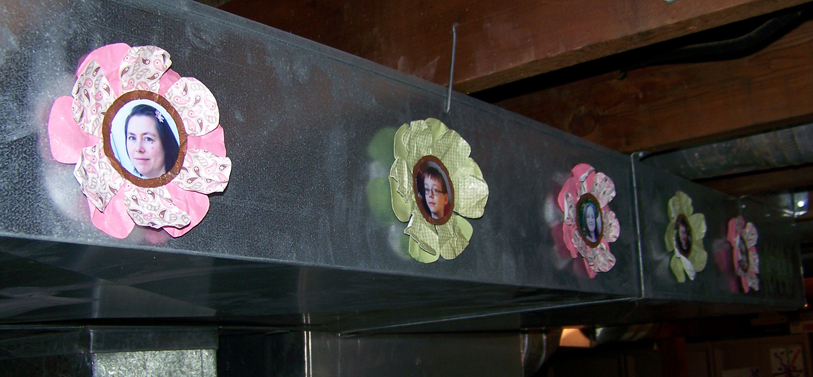
Hey everyone. I wanted to share this project with you today. I made these sweet photo flowers for two reasons. The first is that I am on a mission to decorate my craft space. Since I work in the unfinished basement I don’t have the prettiest of spaces. As you can see here, my craft table faces the furnace and water heater. I LOVE my space but I am getting tired of looking at the utilities. So, I’m starting to do something about it! Then today Robyn, over at My Pink Stamper, posted a message saying she is looking for 2 members for the next term of her design team. In order to apply for the position I have to create an item following her challenge: use the cricut and the colors of pink, green and brown. So I decided to create a room decor item to spice up my space. Keep reading and I’ll show you how I made these flowers and give you some ideas of what else you can do with them!

Recipe

  • cardstock: Bazzill and Stampin’ Up
  • pattern paper: Stampin’ Up and Hot Off The Press
  • spray inks: Tattered Angels & Clear Snap
  • die products: Circut using Plantin Schoolbook
  • foam adhesive: Therm O Web

Steps

1.  Use the cricut to cut your photos into 2″ circles. There are other ways to do this, but this is my favorite method. Choose photos that have the focal image that is about 2.25″ square. Next, create a template that you will use to line up and cut your photos. To make the template, place a scrap piece of cardstock carefully along the guide edges on the upper right of your mat. This part is important because it is going to help you line up your photos correctly. Load your mat, paying attention to where your mat sits flush when you load it (mine sits more to the left of the little guide bump). Insert your mat, choose the circle from the Plantin Schoolbook cartridge and cut once at 2″ (I used the real size feature to be sure my circle is really 2″). Unload the mat. Carefully lift up the top right corner and slip your photo underneath. Move the photo around until it fits how you like within the circle template. Be sure to trim off any of the photo that overhangs the mat! Lift away the template. Load your mat just like you did when you cut the template, then cut that 2″ circle again. Remove your photo, replace your template carefully on the guide lines and repeat this process for each photo you want to cut.

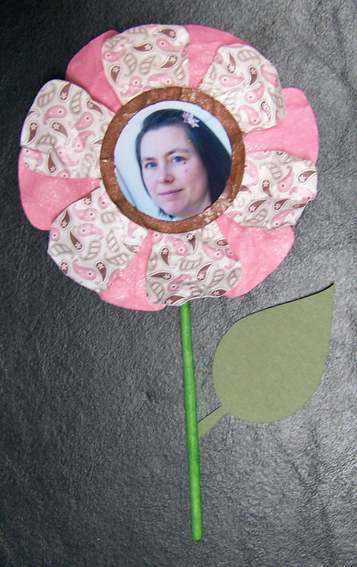
2.  Choose papers for your flowers. I decided to make the flowers have two layers with a center circle to hold the photo. I chose pink papers for the girls in the family and green papers for the boys with brown paper for the center. Each flower has a solid cardstock as the bottom layer and a pattern paper as the top layer. I cut the flowers at 5.25″ and the center brown circles at 2.5″ again using real dial to be sure they come out the size I expectt. Everything then got a good spray of shimmery inks. While the pieces were still wet I crumpled them up and then smoothed them back out to give them more texture. After they dried I assembled everything, using pop dots to lift up the center of the flower just a bit.

3.  I decided to mount these flowers on the edge of the furnace ducts. The sheet metal of the ducts will act as a nice backdrop for the flowers. I used one of my favorite products, 3M Command Hooks velcro-type strips, to attach the flowers to the ducts. That way if I get tired of the flowers or the placement I can remove the 3M strips from the items and move or replace them. The 3M strips have a removable adhesive that can be replaced with refill adhesive strips. Below you can see what the strips look like and how the look mounted to the ducting. And finally you can see how all the flowers look all lined up.

If you don’t have ugly ducts you need to hide, you could mount these straight to a wall, use them in a scrapbook page or how about this idea… Attach each flower to a colored craft stick and add a leaf (also from Plantin Schoolbook). Then stand all these in a shallow vase with foam in the bottom. Add a ribbon to the vase and display this never-wilt bouquet!
I hope I have inspired you to create some home decor item! And I’ll keep you posted with photos as I add on to my furnace camouflage project!

First Video!

I’m so excited. My hubby helped me get his unused copy of iMovie over to my computer and I figured out (FINALLY) how to edit my video. So I have an intro, with music by said fabulous hubby, my video and a lovely ending with more music. Wowza. I feel great having figured all of this out (with some help). Now the video quality isn’t great, but this is my first try so cut me some slack people 🙂 Hope you enjoy!

BTW, I refer to the project I made in the video that has a mushroom on it. You can see the project here.

Playing catchup

As you know I spent a long span of time not doing much in my craft room. That left my kids scrap calendars way behind. And one of the very reasons I do these calendars is so that I DON’T fall behind. Go figure! At any rate, my goal is to get everything caught up by the end of the year and I am well on my way. I have gotten through October for my youngest child and September for the other two.

Here are July and August layouts for each of my three kids. Each of these layouts had their own spark of inspiration. You can see a note on each photo about what inspired the page (other then the photos/story of course) Hope you find some inspiration from them in some way.

*inspiration: The leftover “Friends” rubon from a rubon set along with my Cricut Light Meow cartridge.

*inspiration: The postage stamp frame (aka Technique Tiles) from Technique Tuesday and the fact that I ran out of the letter “e” in my alpha set!

*inspiration: leftovers from a monthly kit and some beautiful buttons that I haven’t put away yet.

*inspiration: I just loved this little piece of burlap I had from some kit. Got my mind rolling in a “nature” way and I searched my stash and found some great nature stickers and seashell themed chunky shapes. Sorry the title “Creature Love” didn’t photograph well at all.

*inspiration: In searching for an energetic paper for this layout I found this star paper and it led the way to the rest of the page.

*inspiration: I scraplifted this one from Creating Keepsakes magazine. There was a layout in there with borders built with circular elements and I just lifted that idea.

This weeks busy work

Every year I think I am going to get it together way ahead of time and every year I don’t. I either just delay or come up with inspiring ideas at the last minute. This year it was a little of both… I delayed on my Christmas cards and came up with inspiring ideas for small gifts for friends at the last minute. So here is what I made this week.

First off, I finished off my Little Book of Thanks album that I had showed you the beginnings of. Just wanted to let you see how I finished the inside. I put a photo of each family member opposite their personal word of thanks. Then I went online and found a quote that in some way fit that persons personality and added it to the opposite page.

Next…Christmas cards! I desgined these on the Gypsy and had a bunch of fun doing it. It was also nice that I could just attend the Cricut when it needed loaded/unloaded. All the other work (cutting all those elements!) was done for me while I worked on other things. Because I used just cardstock and a little stickles these cards cost me less than $2 to make 14 lovely, handmade cards. (Yeah, I know it doesn’t take the cost of the tools into account but that is another story!)

Then…9 votive candle holders out of vellum. I scored some really cheap electric votive candles at Big Lots before Halloween and then sat staring at them deciding what to make. Then inspiration struck! I used alcohol ink to blend a background, stamped my favorite trees (from Stampin’ Up) on there with StazOn, added a date stamp and a snowflake cut on the Cricut. Elegant yet simple.

And Finally, these little cocoa treat pouches. Again, designed on the gypsy and left to cut elements out while I was working on 0ther things!

Gypsy Newbie

I have been playing with my Gypsy and I am loving it the more I play with it.I still have some questions, but so far I am finding it fantastic. I am learning a great deal from YouTube videos posted by other Gypsy users. Just look at the bottom of this post to see what newbie Gypsy videos I found very helpful!

Now the good things about my toy…

  • I love being able to weld images together to create my very own image; this is especially true for making my own phrases.
  • I love that I can spread individual images out over the virtual mat so I can see exactly how much space each item will need to cut. I am finding that this is saving me time and paper because I know exactly how big it will be before I cut. That means no trial and error when cutting my actual paper and having to toss out images that are the wrong size!
  • I love that I can save projects to come back and work on later.
  • I love that I can set up templates for things I might use over and over. For example I set up one file with different card fronts sized at .25″ smaller than the A2 size card. I have a scallop, rectangle, oval and marquee shape.

Okay, so with all the things I love there are still some downsides. I am finding that the search feature is not very complete. For example there may be an image that is a tag that has a butterfly cut in the middle of it. This image in NOT listed in the butterfly category in the search. And if this image is not categorized, how many other images am I missing when I do a word search? Plus, the word I would use to describe a shape, such a flourish or scroll, may not be the word that the Gypsy know the shape to be called. This is some human/computer interface challenge that I mostly knew would be a problem. I was just hoping Provo Craft would have had a more detailed oriented mindset when creating their labels. And a final note on naming shapes… I am not sure how to see what a shape is names once I have seen it and want to use it. It would be nice to see what an item is called so that I could get a better sense of how things actually are labeled so I can adjust my own search style. To solve all this, I wish they had more of a tag feature so that each image could be labeled by the user with different tags. Then they could further the flexibility by allowing users to share tag files so that we could get the benefit of a community of tagger’s data!

*******************************

As I learn more about my Gypsy I will let you all know. In the meantime, I have compiled a listing of very useful YouTube videos for the newbie Gypsy user and a couple of videos for when you are ready to take it to the next level. Enjoy!

What to know when you first open your Gypsy is explained by these videos

Once you are comfortable moving around you will want to get to work using all the cool features. This next set of videos goes over all the main features.

  • Part 1, Part 2 and Part 3 of How to Design with the Gypsy is provided by Cropoholicblog. She covers a little of everything. [TIP: Note that in order to see larger images from the cartridge… push the top left button (top right for lefties) while tapping on an image. I didn’t know how to do this one and it was one of my complaints about the Gypsy until I saw part one of this video.]
  • The above video did not explain the “real dial” size button. However, the Cutting Layers video by Scrapperbug2002 does a nice job of it. She gets to this at about the 2:40 minute mark if you just want to jump straight to it. She has quite a few other nice videos as well. Check out her stuff. Try this feature with lower case text (both on and off) to see the difference it really makes.

Here are some more tips that will make using your Gypsy much more convenient…

  • Using and naming layers is a great feature explained by http://www.JoysLife. Layers are important for cutting different types of paper. Remember the Gypsy will cut one complete layer at a time. You cannot change pressure, speed or blade depth settings during this process. If you are cutting two very different papers, say cardstock and thin pattern paper, for the same project, put each image on it’s own layer!
  • Coping and pasting images between layers is shown by ScrappinGrandma. Note: She has an older version of the Gypsy and so your layer interface will look different.
  • The hide contour feature was explained in another video but I think it is worth repeating here since it can give you much more flexibility with your images. It allows you to tell the Cricut NOT to cut certain portions of the image! Nice explanation by CreativeLadyBug. Remember to use this feature BEFORE you group images. Once there in a group this feature in unavailable.

And now for some more advanced projects…

More Advent

So I have been busy working on various craft projects for the holidays. I wanted to show you the finished results of the Advent projects I worked on. First off we have the rest of the earrings my daughter and I made. She managed to design and put together a couple of pairs all on her own.

The earrings, along with our other Advent goodies have taken their place on our Advent wall. You’ll notice a bunch of little boxes hanging on a card on the right side of the photo. Those are boxes I created several years ago. This year we filled them with the earrings.

The other elements of our advent wall: a Countdown to X-mas sign, advent note cards for my son, and down on the bottom right, large envelopes hanging on a binder ring. You can see an example of how the envelopes are simply decorated since a few are sitting up on the mantel. The envelopes are filled with resurrected Playmobil toys that we dug out of storage. They belonged to my older two children and now they are being passed on to the youngest in her Advent calendar.

A detail shot of  the countdown sign. This was one of the first projects I used playing with my new Gypsy. It was great to weld letters together to create a continuous phrase instead of gluing individual letters down!

I added a Merry Christmas tag to the bottom of the advent boxes since the original one was missing.

The note cards below I made for my oldest. He said this year he didn’t really need an advent calendar. He is at that age where toys are much less appealing (unfortunately he has moved onto expensive video games!) I was just happy that he didn’t get caught up in the greedy “they get something, so how come I don’t” mentality. He was very mature and understanding. But I still wanted to do something for him. So I made these note cards. Each day has a little message tucked into it. Some are just love notes and some are “treats” (like staying up late). I enjoyed making it and I think he is enjoying finding what his message will be each morning.

Happy holidays to everyone, in whatever way you might celebrate them!

Birthday cards

So I was reading My Pink Stamper blog yesterday and she had posted a Birthday card challenge in honor of her son’s birthday. Since I have several birthdays this month, I thought I would get to work!

This one I created for a friend’s birthday who is a beer brewer. He is really quite the fan and I thought I would make a card based on his passion. It is a bit simple and a bit plain but I had fun making it. I used my Gypsy to layout the card, edit and cut the images and create the phrases with the Cricut markers. It made it really easy to see exactly where my elements would fit on my card with the Gypsy! I’m loving this tool more and more.

And this card I just made for the heck of it. I will add this card to my growing pile of cards I will be donating as a raffle item for our family’s homeschool convention that I talked about in a previous post.

I was wanting to play with my Gypsy some more and made this card. This time I laid out my card so that I knew it would all fit just right together. Then I moved all my elements to their own space on the mat so I could load various papers for each of the elements all at once on one mat. I dug through all my scraps to find coordinating papers that would work for each element. I like the gypsy in that it is easier for me to see exactly what sizes of papers I need so that I can just cut up a scrap to the right size!

Advent

Every year we do advent calendars with the kids to count down the days to Christmas. Our callendars have ranged from the purchased chocolate packs to Playmobile gifts to our make-your-own-advent-out-of-Lego-pieces creation. This year I remembered that when I was a kid my mom had found an earring advent calendar that was filled with holiday themed earrings. I thought that might be a fun calendar for my daughter who had her ears pierced just a couple of months ago. I mentioned the idea to her and we went out shopping to find 24 pairs of earrings on the cheap. We didn’t succeed. But we did come up with the crazy idea to make them ourselves!

With great sales at JoAnn we went shopping and came away with tons of beads and wire and enough findings to make all 24 pairs with plenty of supplies left over for other projects. All for $20! We decided to throw in materials that we already have on hand such as craft wire, polymer clay, buttons and some other goodies. So that increases the cost (sort of) but I think it is well worth it.

My daughter did most of the design work and I did the manual labor while adjusting her designs to the real world. In the first night we made 7 pairs of earrings in about 2 hours. That is awesome considering neither of us have ever really made earrings before! I have to admit that I was feeling overwhelmed when I first sat down to start working on these. I was wondering how many hours I would be sitting in the basement chasing beads that fell all over the floor. After a small learning curve using crimp beads to secure the beading wire, I felt pretty confident in my jewelry making skills! I think we did a great job. I’ll post more pictures as we complete more items.

Gypsy

I don’t normally fall prey to the Black Friday frenzy. I don’t like crowds and I don’t like the blatant consumerism that Black Friday represents. However… I do like good deals. I actually read all the eamil adverstisments that came through my email inbox this year. And I found a deal I couldn’t resist. Michaels had the Gypsy on sale for $99. That is the lowest price I have ever seen on it (though I have never checked ebay!). I decided now was the time to break down and get one even though I have qualms about it.

What is a Gypsy you ask? It is a hand-held design tool that goes along with the Cricut electronic die cutting system. I enjoy my Cricut as an addition to my scrapbooking tools but I am not a fanatic like many out there. I find the pros and cons to it. And that goes for the Gypsy as well. The major con of the Gypsy is that it loads your Cricut cutting images from the cartridges and then permanently links those cartridges to that one Gypsy. There is no undo for this process. That means that we can not unlink the cartridge in order to give or sell it  to another crafter when we are tired of it. Everyone gets tired of their scrapping supplies and wants to send then on at some point! This will make it so much harder for someone else to use this cartridge. Yes the cartridge will still work in the Cricut machine itself but that person could never use it with their own Gypsy. I think Provo Craft (maker of both tools) really dropped the ball on this one. I hope that an upgrade to the Gypsy will come at some point in time that will change this closed-minded system.

So, if I dislike that business practice, why did I buy one? Well it has features that I find very useful to my crafting. The Gypsy has a search feature that allows you to look for particular images thought out all cartridges that Provo Craft makes. It has a feature that allows you to turn off certain portions of the cutting image. It allows you to combine images for unique cuts. You can even weld images, such as text, together to create one, new continuous cut. It allows you to design and save cut jobs to use later. It is portable so you can design with your Cricut without having to be right next to it. In short, it is a convenient tool. And I like tools!