New-to-me Cricut shop

My daughter wants a Sponge Bob birthday party for her fourth birthday. So I sat debating whether or not I wanted to buy a Sponge Bob Circut cartridge to decorate up the house for the party. I looked around to see what deals I could find. And at the cheapest — $40 I decided to skip it. Then that evening I came across a blog announcing a Cricut cartridge sale at CricutMachine.com. I’ve never shopped there so I didn’t know what to expect. The cartridges were $16.95 apiece on sale and they had all of the ones on my wish list on sale too. So I ordered Sponge Bob (and a few others). I placed my order on the 4th and it arrived on the 11th. So that was 7 days (only 5 business days). I was happy with shipping speed, happy with cartridge prices and happy with shipping cost. All in all I will recommend this shop and plan on heading there first for my next Cricut purchase.

(P.S. Rumor has it that this shop and one or two others are actually run by Provo Craft and operate on Ebay under yet other names. With the prices they have on cartridges I can’t imagine a separate business being able to pull a profit. After doing a little research, I’ve seen the “they definitely are Provo Craft” and “they definitely are NOT Provo Craft.” So, who knows.)

Gypsy Newbie

I have been playing with my Gypsy and I am loving it the more I play with it.I still have some questions, but so far I am finding it fantastic. I am learning a great deal from YouTube videos posted by other Gypsy users. Just look at the bottom of this post to see what newbie Gypsy videos I found very helpful!

Now the good things about my toy…

  • I love being able to weld images together to create my very own image; this is especially true for making my own phrases.
  • I love that I can spread individual images out over the virtual mat so I can see exactly how much space each item will need to cut. I am finding that this is saving me time and paper because I know exactly how big it will be before I cut. That means no trial and error when cutting my actual paper and having to toss out images that are the wrong size!
  • I love that I can save projects to come back and work on later.
  • I love that I can set up templates for things I might use over and over. For example I set up one file with different card fronts sized at .25″ smaller than the A2 size card. I have a scallop, rectangle, oval and marquee shape.

Okay, so with all the things I love there are still some downsides. I am finding that the search feature is not very complete. For example there may be an image that is a tag that has a butterfly cut in the middle of it. This image in NOT listed in the butterfly category in the search. And if this image is not categorized, how many other images am I missing when I do a word search? Plus, the word I would use to describe a shape, such a flourish or scroll, may not be the word that the Gypsy know the shape to be called. This is some human/computer interface challenge that I mostly knew would be a problem. I was just hoping Provo Craft would have had a more detailed oriented mindset when creating their labels. And a final note on naming shapes… I am not sure how to see what a shape is names once I have seen it and want to use it. It would be nice to see what an item is called so that I could get a better sense of how things actually are labeled so I can adjust my own search style. To solve all this, I wish they had more of a tag feature so that each image could be labeled by the user with different tags. Then they could further the flexibility by allowing users to share tag files so that we could get the benefit of a community of tagger’s data!

*******************************

As I learn more about my Gypsy I will let you all know. In the meantime, I have compiled a listing of very useful YouTube videos for the newbie Gypsy user and a couple of videos for when you are ready to take it to the next level. Enjoy!

What to know when you first open your Gypsy is explained by these videos

Once you are comfortable moving around you will want to get to work using all the cool features. This next set of videos goes over all the main features.

  • Part 1, Part 2 and Part 3 of How to Design with the Gypsy is provided by Cropoholicblog. She covers a little of everything. [TIP: Note that in order to see larger images from the cartridge… push the top left button (top right for lefties) while tapping on an image. I didn’t know how to do this one and it was one of my complaints about the Gypsy until I saw part one of this video.]
  • The above video did not explain the “real dial” size button. However, the Cutting Layers video by Scrapperbug2002 does a nice job of it. She gets to this at about the 2:40 minute mark if you just want to jump straight to it. She has quite a few other nice videos as well. Check out her stuff. Try this feature with lower case text (both on and off) to see the difference it really makes.

Here are some more tips that will make using your Gypsy much more convenient…

  • Using and naming layers is a great feature explained by http://www.JoysLife. Layers are important for cutting different types of paper. Remember the Gypsy will cut one complete layer at a time. You cannot change pressure, speed or blade depth settings during this process. If you are cutting two very different papers, say cardstock and thin pattern paper, for the same project, put each image on it’s own layer!
  • Coping and pasting images between layers is shown by ScrappinGrandma. Note: She has an older version of the Gypsy and so your layer interface will look different.
  • The hide contour feature was explained in another video but I think it is worth repeating here since it can give you much more flexibility with your images. It allows you to tell the Cricut NOT to cut certain portions of the image! Nice explanation by CreativeLadyBug. Remember to use this feature BEFORE you group images. Once there in a group this feature in unavailable.

And now for some more advanced projects…

Stitching!

So I managed to sit down and create this weekend! It did feel good to get some things done. I haven’t really worked on much in a couple of weeks. I have some things to share with you over the next few days (and some things I won’t be sharing since I plan on submitting them!). What I found myself working on yesterday was LOTS of stitching. I had the sewing machine going for almost every project I made. The funniest thing about that is years ago I swore I’d never sew on a layout. I guess the old saying “never say never” is a good one!

So I have got the happy sewing going on here. But you know what else makes me happy with this page? Those alphabets! I am so in love with the tiny type alphabet from Cosmo Cricket and the smokey gray alphabet from American Crafts. The Cosmo Cricket letters come with a full row of each letter. Yes that means you will have a million z’s left over but it also means you’ll have plenty of e’s and t’s to spell out whole messages. I can’t get enough of them. I think I am going to have to restock soon because I am using them up too fast.

Speaking of using things up to fast, want to know another secret about me? I used to buy product and then not be able to use it because then it would be ALL GONE. So it would just sit in my stash and I would admire it. You know, I think I like admiring it much better when it is ON projects! So I don’t feel bad about using it all up. Besides I know where to buy more 🙂

Recipe:

CS, PP: Stampin’ Up
punches: EK Success
marker: Marvy
alpha: Cosmo Cricket (tiny type), American Crafts

More stitching layouts to come…

New Kit Club details

Okay, so I already showed you the first project I made with the Scrapbook Chicks June kit club kit. Here are some more details. The kit is one of two offered for the month of June. These are smaller kits than typical clubs offer, but still jammed with great stuff. There were 4 sheets of pattern paper (October Afternoon), 4 sheets of cardstock, journaling cards (October Afternoon), a cardstock sticker sheet (October Afternoon), a thickers alphabet set and a mini alphabet. The kit also had full color layout examples. But that is not all. The kit included this box of goodness…

The box is what the company calls Chick N’ Scratch. This little take-out box was stuffed with tons of buttons, various flowers, three fibers and some miscellaneous brads, bling and extras. The number of embellishments is amazing in a kit that retailed for $14.99! Yes. $14.99 (plus shipping).

I’m very excited by what I received in this kit. The only problem I had was that their website isn’t the easiest to find things. I found out that if things are sold out, the drop off the website as if they never existed. As a new customer I didn’t see the item that I had just heard about. Not reassuring. I contacted customer service and got a message that they just added more kits to the site. I looked and I ordered right away fearing they would disappear again. I’m really glad I did! The kit was well worth it. I might have signed up for an ongoing membership (avilable in 1month, 3month or 6month terms according to the order form drop down menu) except that I could not find any information on how the kit club worked! Would I have  a choice of the two offered kits? Any skipping options? When would the new kits be out? Sneak previews, full reveals etc? No info that I could easily find. I’ll have to contact customer service again it seems.

Now I’m curious to see what comes out for July. So far the website doesn’t seem to have the same offering. Are they sold out already just from membership? Are they not posted yet? The website is unclear. The kits are great and I will keep an eye on the website to see what I can learn about how they run things. If I find out anything new, I’ll keep you posted!

New Kit Club

Super quick post for you today. I listened to an interview with Kim Garner on The PaperLife a while back and she talked about Scrapbook Chicks. This company started out making scrapbooking T-shirts and has moved on to carrying other scrapbooking products. The thing that I got excited about is that they are offering smaller subscription kits. I just bought one and want to review it for you. I’ll have to get to the review part later as I am helping a friend out today. But here is a sneak of what I have done with the kit (and a couple extras).

Recipe:

Scrapbook Chicks kit: Buttons, flours, butterfly rhinestone, alpha stickers, Journal Card & Pattern Paper (October Afternoon).
Extras: Glitter spray (Clearsnap), Tree mask (Cricut), punch (Stampin’ Up)

Review: Scrapbook Rewards Credit Card

Today I am telling you about my experience with the Scrapbook Rewards Credit Card. This card began, as far as I know, as an effort by Lisa Bearnson and Creating Keepsakes Magazine. After seeing the credit card info booth at a Creating Keepsakes Convention, I looked up a bit more info and decided to sign up. That was about 5 years ago and I can tell you how it has gone for me.

The actual credit card function has been just fine. However, I have had numerous problems with the rewards system — the main reason for choosing this card in the first place. In the beginning, the website did not work at all for ordering items with points even though it was setup to do so. I always had to call in my order. Even now the website it sketchy. Sometimes my online order will go through and sometimes it won’t. Not only that, but the items listed on the website aren’t always current. Time and time again I have ordered products with my points only to get something different, or in the worst case, nothing at all. I have had to call many times to correct errors in my orders. This has been endlessly frustrating. The biggest problem I had was that somewhere along the way the credit card company changed hands and Creating Keepsakes Magazine changed hands. In all the shuffle one of my missing items never got properly refunded and I lost a large number of points.

I have considered switching credit cards to another rewards type card. But so far I have not found another rewards system that would provide as much benefit. For example I recently ordered  a bunch of items with my points (I tend to save up points and order a bunch at once). I received two scrapbooking how-to books, a pile of flower embellishments and some embossing templates. When I do get my items successfully I really enjoy them.

Final recommendation: If you don’t mind calling in your order and you can have backup items in mind to order should your first choice be unavailable, then this may be a credit card to consider.

Book Review: Photo Freedom

Today I am taking a look at Photo Freedom by Stacy Julian with you. Again, I got this as part of my Scrapbook Rewards credit card. I have heard quite a bit about this book in interviews with Stacy and around the scrapping blogosphere. I chose this book because I thought it would talk about how she chooses to scrap outside of chronological order to scrap feelings and relationships more.

I certainly got that out of the book. However, what I mainly got was how she physically organizes her photos. I’m an organizer but this system goes way beyond me. In a way I loved her organization and in a way I thought it was a bit overkill.

So goes step by step on how she chooses, prints and the stores her photos. She has categories and subcategories in filing drawers for her photos. When they get too old she pulls photos out and puts them in what she calls cold storage. All of her scrap albums are based on themes such as seasons, relationships and more. This allows layouts to fit into an album without needing to be chronological.

What I liked about this book… Her idea of keeping photos with other like photos allows for making connections that may not have been made before. The idea is to print all the photos you might want to scrap and keep them gathered so when you have a few minutes you can flip through your drawers, pull some photos that inspire you and get to work.

What I didn’t like about this book… Here is where my bias comes in (and the part where I think her system is overkill)! I am mainly a print-from-home scrapper. The idea of physically printing hundreds of photos makes me cringe. Yes I am a scrapper and yes I do consume a bunch of pretty papers and embellishments. But being so wasteful as to print that many photos only to have them sit in boxes in the closet makes me sigh. I print from home specifically so I can reduce my consumption and waste. When I print only the pictures (already cropped!) in the sizes and quantities I KNOW I will use, I am saving resources, money and the environment!

How I will use this book… I am a digital photographer so that makes a big difference in how I work. For scrappers out there who still use film then this system would make a lot more sense. I can see applying this system to my iPhoto library. That way I can have the categories and the connections without requiring the printing of hundreds of photos. I can easily flip through my digital library, select photos and export them to crop and print from my Photoshop Elements. Yes it takes more time than pulling things that are already printed. But it is worth it to me not to print photos only to hide them in a closet.

In the end, if you are stuck in the “have to keep things chronological” mindset, this may be a very good read for you. With this way of thinking you can never “fall behind” in your projects. Also, if you regularly use a printing service then this could be a very good way for you to store your photos when they arrive home. I really like what this book tries to accomplish and I think you might too.

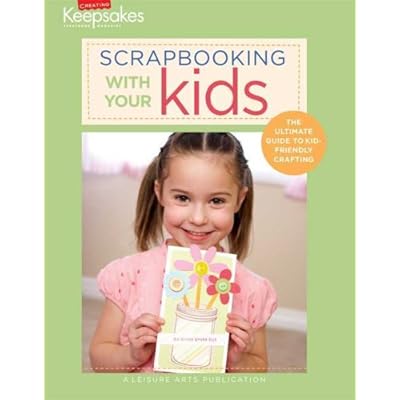
Book Review: Scrapbooking With Your Kids

I’ve got a few book reviews I’d like to do this month. I’m gonna start with this one… Scrapbooking With Your Kids, a Leisure Arts Publication for Creating Keepsakes Magazine. I got this book as a part of my Scrapbook Rewards credit card (to be reviewed soon).

In doing reviews I would like to get my bias out right up front so you know where I am coming from. I don’t usually buy scrapbooking books. I’m not the kind of person who goes back to the same publication over and over for inspiration. I don’t find spending money on a book that I am only going to read through once a good use of my money. I’d rather have a magazine subscription that brings me new ideas frequently.

I ordered this book with only having the title and the photo of the cover. The title is “Scrapbooking” with your kids. I expected the book to be design tips for kids. Instead it turned out to be a step by step craft project book, about half of which happened to be scrapbook pages. My kids and I approach crafts in a very freestyle way. None of us really like to follow a step by step project. We get our own ideas then roll with it. Often my girls are more concerned with the process of creating rather than the finished product. For that reason I did not enjoy this book. If I am looking for a specific product-driven project I am likely to search the web, not turn to a book. In addition, I homeschool my kids so we are very comfortable doing projects together. I found this book to have the feeling of a publication aimed at scrappers who don’t usually do projects with their kids.

With all that being said, I do have some positive things to say about the book. The photos were beautiful and some of the projects certainly were cute. I liked the layout of the book with projects broken down into categories like parties, holidays and summer. There was a handy project listing in the index and a detailed supply list in the back.

Overall I would not have chosen this book if I were paying cash. (It did make good use of my credit card rewards points however.) I can see myself making some of the projects as gifts either for my kids or for other people. I don’t really see myself sitting down with my kids and saying, pick something to do today. I think kids get enough step-by-step activities in their lives. I think their art and craft time should be open to experience and experimentation with guidance and advice if they need help making a vision a reality. I can see leaving this book out in the living room to be accessible to my kids. If they happen to pick it up and want to make a project, I would be happy to help them finish it.

So think about who you are as a parent and who your kids are. Do they like just cutting, gluing and plopping stickers onto paper or do they really like to make a finish product? Are you comfortable looking at a picture of a project and thinking you could make that or do you need instructions on each part of the creation? This book may be for you. Or, if you are like me you might want to spend that money ($22.95 retail) on extra stickers and glitter instead.

Photo printers

My scrapbooking life changed a few years ago when I purchased a new tool. Now I don’t think I could live without it. It is my portable photo printer. I hadn’t purchased a photo printer before this because I had a hard time finding the size I wanted and because the cost per print was much higher than what I was used too paying. I wanted to be able to print 4×6 and also 5×7. Most didn’t do the larger size. This printer is an HP Photosmart A616 and I love it. Not only did I get those print sizes that I wanted, but this particular printer can do 4×12 panoramic prints as well.

Printing at home costs more per print, but I find in the end it actually costs me less. This is true because I only print the photos I really want when I want them. No leftovers, no unused photos, no duplicates lying around. I use Photoshop Elements to crop & correct my photos before I print and if I am using small sizes I can arrange multiple photos on one sheet of paper. This means less cropping trash going into the garbage.

I found that this printer was freeing because my photos were actually holding me back from scrapping. I would have a pile of digital prints that I had to wade through. I had to decide which ones I really wanted to print. I had to wait until I had enough favorite saved up to upload to a printing site (or burn to a CD for in store printing). Then I got this pile of photos back and felt overwhelmed that I had to scrap them all right away. It was just too much for me. Having my own printer & editing software meant I could have my photos in whatever size I wanted when I wanted them. It actually made it easier for me to create!

I don’t know what printers are on the market today, but if you have been thinking about a portable photo printer go searching and see what you can find. You just might find what you are looking for.