NSD Challenge 8: Circles

Final challenge of the day! Okay, I love circles. I guess I have been on a circle kick for over a year now. Because I love circles, you should love circles too! Ha Ha! So here is my challenge for you. Use a circle, big or small, one or many, as a mat. Mat a photo or an embellishment. Doesn’t matter how you use it, just use it.

Remember to post your project to your favorite online gallery and leave a comment here with a link to your post. I’d love to see your project!

NSD Challenge 7: one large photo

I don’t enlarge photos very often, mostly because it is just so easy to print regular photos off on my photo printer. But every once in a while, I will actually get up and change the paper in my regular printer over to photo paper and enlarge one great photo. Now you go do it. Put some photo paper in your regular printer and pick one photo that speaks to you. Make it big, make it speak louder!

Remember to post your project to your favorite online gallery and leave a comment here with a link to your post. I’d love to see your project!

Recipe

  • pattern paper, cardstock: from stash
  • alphas: Scenic Route
  • journaling tag: Luxe

NSD Challenge 4: Old photos

Okay, go through your photo library, be it pre-printed or digi. Look for something that is more than 2 years old. Doesn’t matter what it is. Just pick the first thing that grabs your attention. It grabbed your attention for a reason. Tell that story.

Remember to post your project to your favorite online gallery and leave a comment here with a link to your post. I’d love to see your project!

This pattern paper had the words “all boy” printed throughout it. You can still use paper if it doesn’t fit your theme, but covering up unwanted elements.

Recipe

  • pattern paper, arrows, journaling tags, rubons: from stash
  • alpha stickers: Piggy Tales
  • buttons: Sassafras
  • marker:

NSD Challenge 3: Use a grid

Okay, take photos, paper, embellishments and journaling blocks and put them in a grid. Use whatever size you need. Don’t stress over it. Just toss them on the page and line them up. You may find that just picking a size and throwing the items onto the page can save you time and stress on how to design your page.

Remember to post your project to your favorite online gallery and leave a comment here with a link to your post. I’d love to see your project!

Recipe:

  • all elements from Piggy Tales

Scrapping a secret

So I recently scrapped a secret. It was interesting to make a page and not give away what was happening! The story is this… My friend has become a cat/kitten foster parent. She got her first batch of kittens several weeks ago. We had a chance to go and visit the mama with her little babies. My daughter has been wanting a cat for a while now, but due to some problems we’ve had with pets in the past we weren’t sure we were ready. But my husband and I were talking about the kittens and were coming to the conclusion that we could adopt them and try the pet thing again. So as my daughter was cuddling these little cuties it was in the back of my mind that they may be coming home with us. We didn’t tell our kids any such thing because we didn’t want to get their hopes up in case we changed our minds. As I was making this layout we still had not decided whether or not we would take them. All my journaling had to play around what I was really thinking and feeling in order to keep this secret.

Have you ever scrapped a secret or surprise? You should give it a try, it is an interesting experience.

Supplies:Pattern paper, alpha stickers, rubons (Piggy Tales); vellum, inks, punches (Stampin’ Up); stamp (Technique Tuesday); die cutter (Cricut with Storybook cartridge)

Things I love

I am in love with a bunch of scrapbooking goodness right now. Some of them I discovered in scrap classes at Creating Keepsakes Convention back in February such as the paper below from Cosmo Cricket. (It is just a rainbow of prettiness.) Some of these things grew on me over time such as stitching. Some of them I just decided on day that I really liked such snails and mushrooms. Regardless of where my love came from, they make me happy and I thought I would share!

I used many of my favorite items on a layout just about… my favorite items! It was a good excuse to put everything pretty on one page. I had fun just playing with products. Here is what I made. It is a double page 6×6 spread for my Pieces Of Me Album. I’ve said it before and I’ll say it again. I think it is important to record your own life as well of that of your kids (for the majority of you who scrap kids and grandkids!).

You’ll notice on the left side there is a little tag sticking out. Well that actually is a tag book that I made that is a big list of my favorite things. Take a closer look…

So go make a page about your favorite things!

P.S. I will have my first video tutorial coming up on how I made the cute little mushroom on my page. So keep an eye out for that!

Inspiration lingers

I have been reading Creating Keepsakes magazine for years now. I started by reading back issues from the library and when those ran out I broke down and got my own subscription. This magazines, other magazines and blogs are filled with inspiration. Sometimes I find I am spending more time reading than scrapping. But all that time is not wasted. Ideas are being logged by my brain, sometimes without my even knowing it. For example I just created this layout.

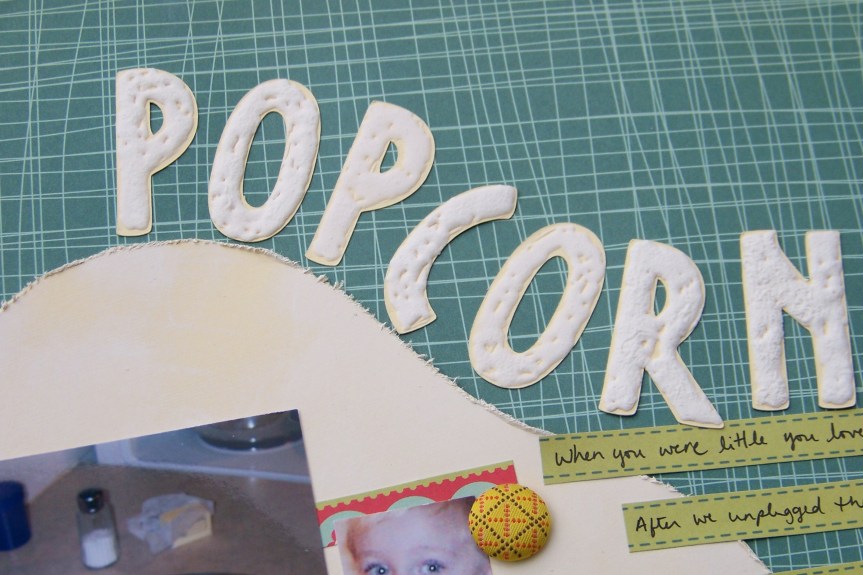
Popcorn Layout

I had fun cutting out cardstock in the vague shape of popcorn for the background, inking edges to mimic butter and adding a fun title. Now here is where the lingering inspiration comes in.

I created the title using Liquid Applique by Marvy. This is a glue like substance that you smear over your project, in this case letters I had cut out with my Cricut (Opposites Attract cartridge). Let the applique dry over night and then heat with a heat gun. The product then gets puffy and, well, popcorn like!

Puffy title created with Liquid Applique by Marvy.

I was pretty excited that I had come up with my very own technique! Well, the more I thought about it, the more I became sure that I had seen something almost exactly like this in a Creating Keepsakes issue. So it wasn’t an original idea, but it turned out to be a good idea!

If you ever feel like you are “wasting time” reading about your hobby more than doing your hobby, don’t worry! All that data is going into your brain, swirling around, combining with other ideas and it will eventually come out somewhere in your work. So you have my permission to pick up a magazine and go read.

My scrapping style

Over the years I have learned that any paring of memories and photos means scrapbooking to me. I bet there are tons of people out there who don’t even know they are scrapbookers by that definition! It just goes to show that there are a lot of ways to preserve our personal histories. I just so happen to really enjoy the design aspect of making layouts and playing with interesting papers and other goodies. My style may not be your style. But I think we can learn from each other anyway.

I tend to create very clean and simple layouts. I like when things match well. I am fairly literal with my embellishments. If the page is about swimming then you better bet there will be waves on my page. I like symmetry. When I am feeling wild I may tilt a photo on it side. Now that is adventurous! LOL. But it works for me.

It is funny that I am such a clean and simple girl since many of the layouts I am attracted to are more artsy and layered. For a while I tried to make layouts that resembled the ones that I drooled over in magazines. And it didn’t really work! Somehow, I realized that I shouldn’t be doing that. I should let my art take its own path and be okay with that. Yet I don’t let my style keep me in a box. I am able to play with techniques and products and not feel like I HAVE to create something amazing. I can allow myself to just play and see where the process takes me. And when something less “me” comes out I am amazed and fascinated by that process.

What is your style? What styles are you drawn to? How has your style changed over time? Leave me a comment. I’d love to hear about your process!

Spring layout

I submitted this layout to  The Paperlife blog for their spring themed feature. I just saw this morning that Amy over there decided to use my layout! Yeah! And thanks Amy. So I thought I would do a post on the steps I took to make this layout.

All the flowers in my yard are so spread out that it is hard to enjoy them all at once. So I wanted to bring all the pretty blooms together in one place. I began with the idea of a grid of 4 photos, each 4×4 inches. Then I wanted to support the color in each photo by matting them with coordinating pattern papers. Sorry this next photo is a little blurry! The top two papers are from Basic Grey and the bottom two, as well as the cardstock base, are from Stampin’ Up.

I decided I wanted to contain all the flowers within a large circle. Circles really are my favorite element right now. So I pulled out my Cricut Plantain Schoolbook cartridge and loaded in a sheet of Stampin’ Up cardstock. Using the centerpoint feature on the cricut I moved my blade to the middle of the mat, cut one large circle and then cut one circle that was about 1/2 inch smaller. This left me with a circular ring to use on this project. (The leftovers are  a sheet of cardstock with a circle cut from it and a large circle that I will save to use on other projects.) I took that cut ring and laid it on my layout, moving it around until I got the placement I wanted. I ended up placing it on top of the photos and then tucking it behind a bit of the photos and mat at the top.

I then wanted to flood the edges with pretty flowers. But I also didn’t want to detract from the photos so I went with small neutral flowers. I used my Cricut Pagoda cartridge to cut out a bunch of flowers from cardstock. Then I used Glimmer mist to spice up the flowers in silver, pearl and latte. I crumpled up the flowers for added texture and placed gems, pearls and buttons in the center to finish them off. The final touches for the page were the tabs at each photo to label the names of the flowers, the title cut out of vellum with the Cricut Opposites Attract cartridge, and the date handwritten with my favorite Uni-Ball Signo white pen.

Scrapbook Calendars

I have been recording small daily tidbits since my first child was born. I took a regular dollar-store type calendar and just wrote notes on it. I recorded the big things like my son’s first steps to the small things like taking an extra nap that week. When I approached memory recording in such small chunks I didn’t feel like I could fall behind. While my journaling was up-to-date, it took me years before I took this approach with my layouts! I felt so far behind until I started using BLANK calendars to do my layouts AND my memory recording.

I now approach my scrapbooking a month at a time. I look over my photos from the previous month and choose  photos to tell just one story for each child from that month. All the other stories are already recorded in the calendar journaling format! I don’t feel like I have to capture every interesting story in a full scale layout. I hang my calendars in the living room and it acts as an ever changing home decor item as well! You notice in the finished layout below the binder ring at the top used to hang the calendar in the house and the spiral binding at the bottom that holds all the pages together.

I got my first calendars from Stampin’ Up, though they only carry desk size calendars now. There are many companies that make calendar items such as 12 x 12 calendar paper from Creative Cafe available at Two Peas in a Bucket or the Year of Memories Keepsake Calendar by SRM Stickers available from Addicted to Scrapbooking. I’ve never used those products but it is something to get you thinking about what is available. Check your favorite LSS or online retailer for more items.

I used the 81/2 x 11 calendars to start with. You fill in months (I used stamps) and dates (I wrote in mine by hand) in the provided calendar grid and then use the blank page to do your layout. My goal was to do ONE layout a month for each child. That was only 3 layouts a month total for my 3 kids. I felt like that fit my busy schedule!

You can see below how an 81/2 x 11 page looks tucked into a 12 x 12 album. Because the calendar pages are back to back I had to place the pages in sideways into the book to prevent some pages from being upside down. This was something I didn’t think about when I started the calendars. But I just let it go and put the pages in sideways. No big deal.

After a while I got tired of the 81/2 x 11 size and the back to back limitation. So I decided to do my own calendars. I used Microsoft Excel to create a calendar template (also available from my Freebies page). There is the original .xls formated document (calendarblank.xls) which you can open, edit and print. There is also the .pdf version (calendarblank.pdf) which you can’t edit but can print as many as you want. Now these pages are in 81/2 x 11 format since I only have a printer that allows me to print that size. You can use the smaller page to incorporate onto a 12 x 12 layout, use it on a companion page for a double page spread or tuck behind a layout as hidden “journaling”.

As you can see from the photos above, I punch my calendar pages with a 3-hole punch and store the in a 3-ring binder. I used tab dividers to keep the pages separate for each of my kids. I keep the binder on a bookshelf in the living room for easy access. I even tied an ink pen onto one of the binder rings with some ribbon so I would never have to go looking for a pen.

I plan on adding in a calendar section for general family stuff –all those layouts that apply to no one child in particular, to my husband, to myself or to all of us collectively. This will bring my total monthly layouts to 4. A very manageable number I think. If you are like me and really like to stay chronological and up-to-date you’ll appreciate this method. Give it a try and let me know how it goes!