So we were on vacation and I forgot to bring a thank you card for the owner of the home we stayed in. I decided to find the LSS and pick up some papers to make a card. With just papaer, a pen a ruler and a glue stick here is what I came up with.


So we were on vacation and I forgot to bring a thank you card for the owner of the home we stayed in. I decided to find the LSS and pick up some papers to make a card. With just papaer, a pen a ruler and a glue stick here is what I came up with.

I was back in my space recently making a birthday card for a clipper ship fan in my life. I had no clipper ship anything in my stash so I decided to try drawing one. I am not the best drawer and there are some technical mistakes to the piece but, heck, I am pleased with how this came out. Here is my “cheatsy” tip for you today: find a piece of clip art online and use it as a visual guide for drawing! That is just what I did. It helped me get some clearer proportions and better graphic detail.
Recipe
cardstock: Stampin’ Up, X-Press It Blending Card
stamps: Technique Tuesday
inks: Ranger, Tsukineko
glimmer spray: Tattered Angels
embossing powder: Stampin’ Up
pen: American Crafts
markers: Copic
clip art inspiration: http://www.clker.com/clipart-galleon-sail-ship.html
Before I began I cut my card layer, sprayed with different colors of glimmer mist and inked the edges. I added travel themed stamps with versamark and clear embossing powder. I then gave depth to the stamps with more ink. Once that I was done I went to work with my drawing. I used a 03 American Crafts pigment pen to sketch out the image. I then went back and darkened my lines and colored in with Copic markers. I inked in more blue around the waves. I used my Signo Uniball white pen to add some detail to the water and the sails. The edges were frayed and it was ready to go on the card. On the card based I inked more of the blue and brown. I added a scrip text stamp in a very light inking to add some textural and mood detail both inside and out. Remember you are not just sending a card you are sending a feeling captured on paper. The more detail you add, the more you capture that feeling.
I got my scrap space cleaned up these past two weeks. It really was a massive disaster zone. It was so bad that I just couldn’t take any pictures. I was feeling motivated to scrap so that helped me get things cleaned AND getting things cleaned made me more motivated to scrap! So I have a binder full of ready-to-scrap photos with page layout ideas. When I have a few minutes here and there, things will be waiting for me to put together.
Here is the page I got done this week. I am working on my kids scrap calendars back from April. It really has been that long since I have done any scrapping. When I lost my mojo, it got really, really lost. Now I think it is back, and hopefully not just for a brief visit. And I think I can keep it hanging around by cleaning up my space as I go and not letting the mess get so out of control. That is my scrappy tip for all of you today!

Recipe
pattern paper: Fancy pants (background), Stampin’ Up and Basic Grey
punches: Stampin’ Up
journal marker: American crafts
other: bead chain, staples, wet adhesive, Photoshop Elements
For this one I pre-printed my main photo with some journaling (yeah I know one word is cut off a bit) and my title. I emphasized this photo with a border built in to the print. This saved me some time with title and matting. I went with some softer paper to go with my daughters softer personality. Throwing in some hard metal – bead chain and staples – helps support the dental theme. Using the bead chain for metal allows me to curve it and keep it softer and not too harsh. It felt really good to throw together a quick and lovely page. I hope I have more for you soon!
The only crafting I have been doing lately is immediate gift/card items. I haven’t even been planning ahead for upcoming birthdays etc. In fact I actually {gasp} bought a birthday card for a party last month. Sigh.
At any rate it felt good to get down in my craft room and make something, even if it was atop a mile-high pile of mess on my table (reason #2 for not crafting right now).

Recipe
cardstock, stamps, punches: Stampin’ Up (separate image and text stamp sets)
ink: Ranger distress
ribbon: Ofray
Blend inks onto white cardstock, spritz with water and layer over card. Ink white ribbon and let dry. Ink up stamps for images, stamp off on scratch paper 2 times, then stamp for third time on white paper without reinking. Repeat with text stamps and stamp for third time over each image with different phrase. Punch out images. Stamp sentiment in full inking. Punch out. Adhere images, ribbon and sentiment to card.
This gardening season has been very low on my usual veggie gardening and high on my rare ornamental gardening. But I am finding so much joy in choosing and arranging plants in lovely garden beds. Today I did more of the same. My husband and I put together a greenhouse kit recently and it was just calling out for a pretty floral border in front of it. I had some flag stone leftover from working on my shade garden. I had put in the flagstones way before the shade garden plans and decided they didn’t really work into the new layout so I removed them and left them sitting in the driveway for weeks. Those leftovers were perfect for some hardscaping around the front of the greenhouse! I hope you enjoy my little piece of country-cottage gardening.


My daughter really wanted to buy herself a cute little Pokemon plushie and had a wad of cash in her wallet to do it with. After searching high and low around town we found nothing that interested her. In our internet search we found interesting plushies but the prices made her cringe. So we turned to DIY. For the same price as buying her favorite plushie online, be bought fabric and fiber fill that will make half a dozen plushies. While we won’t make that many – the supplies will be saved for some future projects – we did have a good time making our own little Pokemon-like critter.


I’ve got more photos for you. I was playing with shutter speeds in this series. I wanted to see what would happen in various situations. None of these photos are stunning but a nice learning process. All images have been cropped but not otherwise altered.

Some long shutter (bulb setting) for fireworks.
18mm
1/1.3s
f 3.5

Really long bulb.
18mm
43.7s
f 3.5

Trying for the light/dark silhouette.
55mm
1/40s
f 8

Playing with trying to capture motion blur. Used shutter priority setting.
29mm
1/30s
f 7.1

And again. Shutter too slow for what I wanted. The motion almost disappears.
29mm
1/10s
f 8
I am pretty dang excited about my new camera. You can see the story of why I upgraded from a point-and-shoot to a dSLR in my previous post. I have been practicing and experimenting ever since I got it. I picked up books from the library on how to understand all the exposure controls. I certainly knew what the controls meant but I had no idea how to set them together to get photos to be well exposed. I had a smack-myself-on-the-head moment when I realized there was a light meter display right inside my view finder. Well sheesh, that just makes things too easy now doesn’t it! Once I had that figured out I was playing and playing and playing with changing aperture vs. shutter speed vs. ISO.
I have this book to thank for making some of these settings easy to understand.

I was/am really a newbie and did not know where to even begin setting the exposure controls. This book explains things for the absolute newbie but is easy enough to follow to skip things that are already known. Most of the other books I checked out from the library, while beautiful, already assumed basic camera operation knowledge. The Dummies books bug me with their over abundance of puns, but when you need to start with the very basics this book is a good thing.
So here are some of my first photos on full manual. All photos are straight from the camera and have only been adjusted for file size.
1. First real attempt at manual mode. Started with bright indoor photo with natural light. This is our cat Adam and I love to watch him bask in the sun.

2. This is my 4-year old. The one who broke my point and shoot. At the time I wasn’t sure whether to feel mad or not. Now I just feel thankful that it brought me to a new camera. In this photo I’m working on composition and depth of field. I love seeing her little bike back there just waiting for her to get that helmet on.

3. More depth of field. I was actually trying to get her fingers in focus and her face in the background. I think I know how to recompose my shot to get it to work how I intended. But I don’t know if I would want to. This shot came out really well with her little eye peeking out.

4. Yet more depth of field. This is why I wanted a dSLR in the first place. I wanted to capture more artistic photos and not just plain-old snapshots. Remember that dog I told you we dog-sat in my last post? This is the very creature! I wanted to get more of my daughters face in this one, but sometimes it is hard to get a good shot with pets and kids all at the same time. A less than perfect shot is better than none.
5. Okay, this was the scary shot in full manual. I was indoors in very dim lighting shooting a photo of my friend’s daughter. I was sure it would be horribly under exposed and/or blurry and/or grainy. It was a little blurry but really not bad for my first try! Next time I would open up the aperture more (I think I had one more stop available) in order to get a faster shutter for less blur. I don’t think I would touch ISO as I was at 800 already.
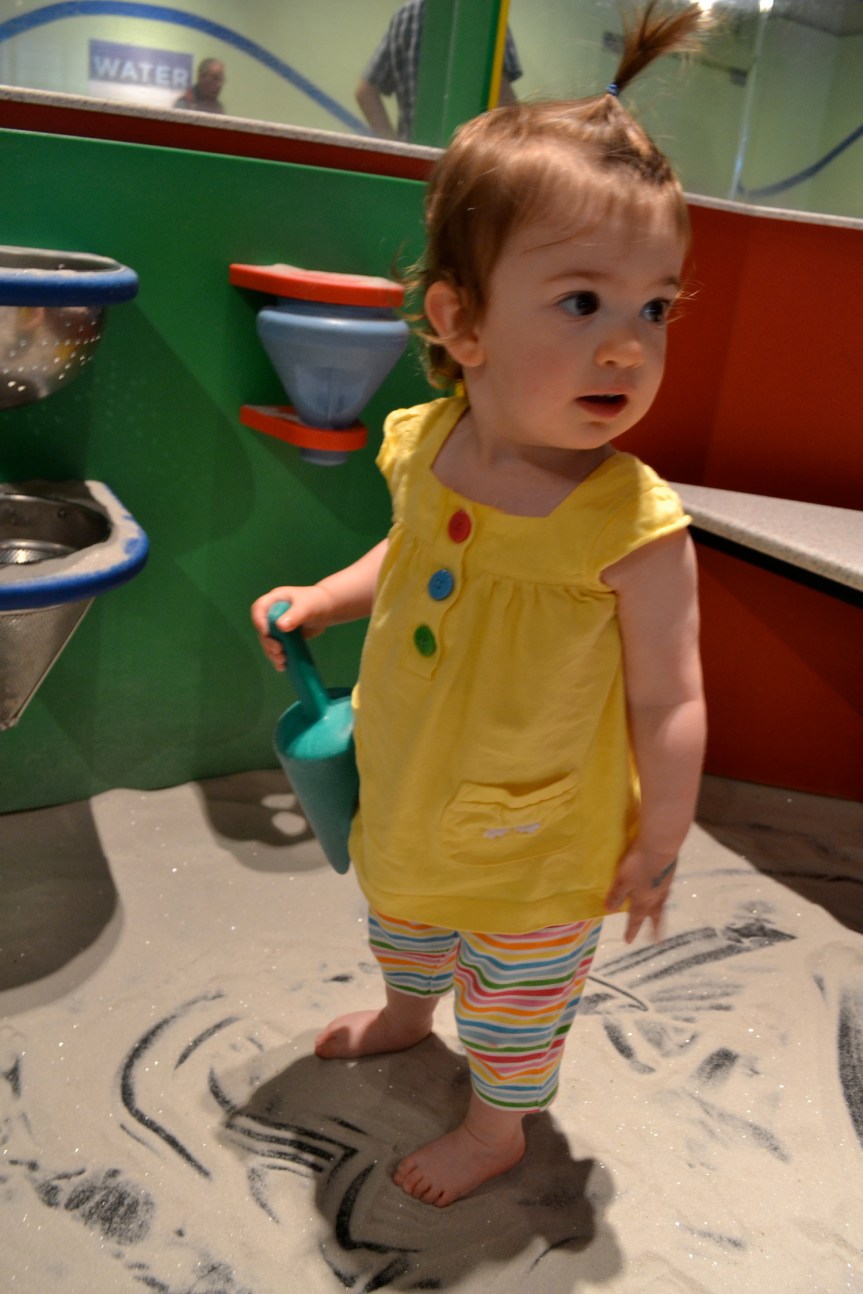
6. Here is little miss again. But in better lighting. Still a bit underexposed I think.

6. And my final shot of little miss’s mom and her expected twin brother’s. This shot could use some cropping for composition to eliminate too much dead space behind mom. But I got enough of the shot to allow me to crop it later.

Thanks for sharing my photo adventure with me. I am really excited about unlocking the power of this camera!
It looks likes it has been about a month since my last post. Life has pulled my attention in different directions. I have only made 3 crafty projects in the past month and only photographed one of them. So I will share that one here with you today.
We had the joy to share some dog-sitting duties with another family to take care of a mutual friend’s beloved pet. This dog was such a treat to take care of. We had a dog a few years ago that was NOT such a treat in any way shape or form. So, to have this dog come into our house and be such a sweet creature was fantastic. We were only supposed to have the dog for a day but finagled our arrangement so we could keep her an extra day. I made this card to say thank you to a sweet young friend who was supposed to get the dog-sitting privilege a day early but had to wait for us so we could have that extra day.

RECIPE
cardstock, stamp: Stampin’ Up
ink: Ranger (green, black), Stampin’ Up (white)
die cut: Provo Craft (A Child’s Year– Cricut cart.)
border punch: Fiskars
I probably won’t have many projects for you in the coming months as the sun, gardening, family, my new camera, and travel plans will be my main focus. There are only so many hours in the day and I have to choose how I spend them and right now my crafty mojo is really low. Such is life. Enjoy your summer (at least in the norther hemisphere)!
My point and shoot camera died last week. It had been on it’s last legs for a short while after being dropped by my 4 year old. I had thought it would hang in a bit longer. But no. When it finally keeled over, it was very near my birthday so we decided to upgrade to a dSLR for my birthday gift! I had only used a point and shoot my entire life but I had been working on composition and learning how aperture affects depth of field for the time when I would be able to upgrade. Well that time came sooner than I thought it would.
So there I was with a new camera in hand and just days away from our annual homeschooling conference. I didn’t know how to use this new tool but I had to do something. I set it to auto-no flash and just started shooting. I tried out various situations to see what it could and couldn’t do. The results were surprisingly nice. The camera can take much better pictures indoors (no flash) than my old camera. That is a relief since most of my photos are snapshots of my kids playing inside. The auto setting on the camera is smarter than my old camera. It is adjusting for depth of field much better so I am getting some lovely in focus foreground and blurred background images without having to choose settings. While it is better, I still want to play with settings manually to see how far I can push it because I wold like it to go even farther. Finally, the camera is just fun to use. I feel like the photographer I want to be with this cool tool in my hands!
Here is what I accomplished with this tool so far. These photos are straight from the camera (except cropping out distractions on the two as noted).


 craftysoup.com